Accounting
Total Business Care professionals provide a broad range of accounting skills that best assure to our clients timely input, reporting and review. We advise, train + support you to grow your business.
Measurement and analysis is essential to successful management.
Whether your business is new or established, small or large, product or service oriented, TBC is experienced in supplementing your present staff or completing all the accounting necessary for the success of your business. We ask our clients to do what they do best, and we will take care of the rest.
We are organized to provide accounting and financial services in the offices of our clients, in TBC’s office located in Fremont CA, or even remotely. Through the use of the Internet, we:
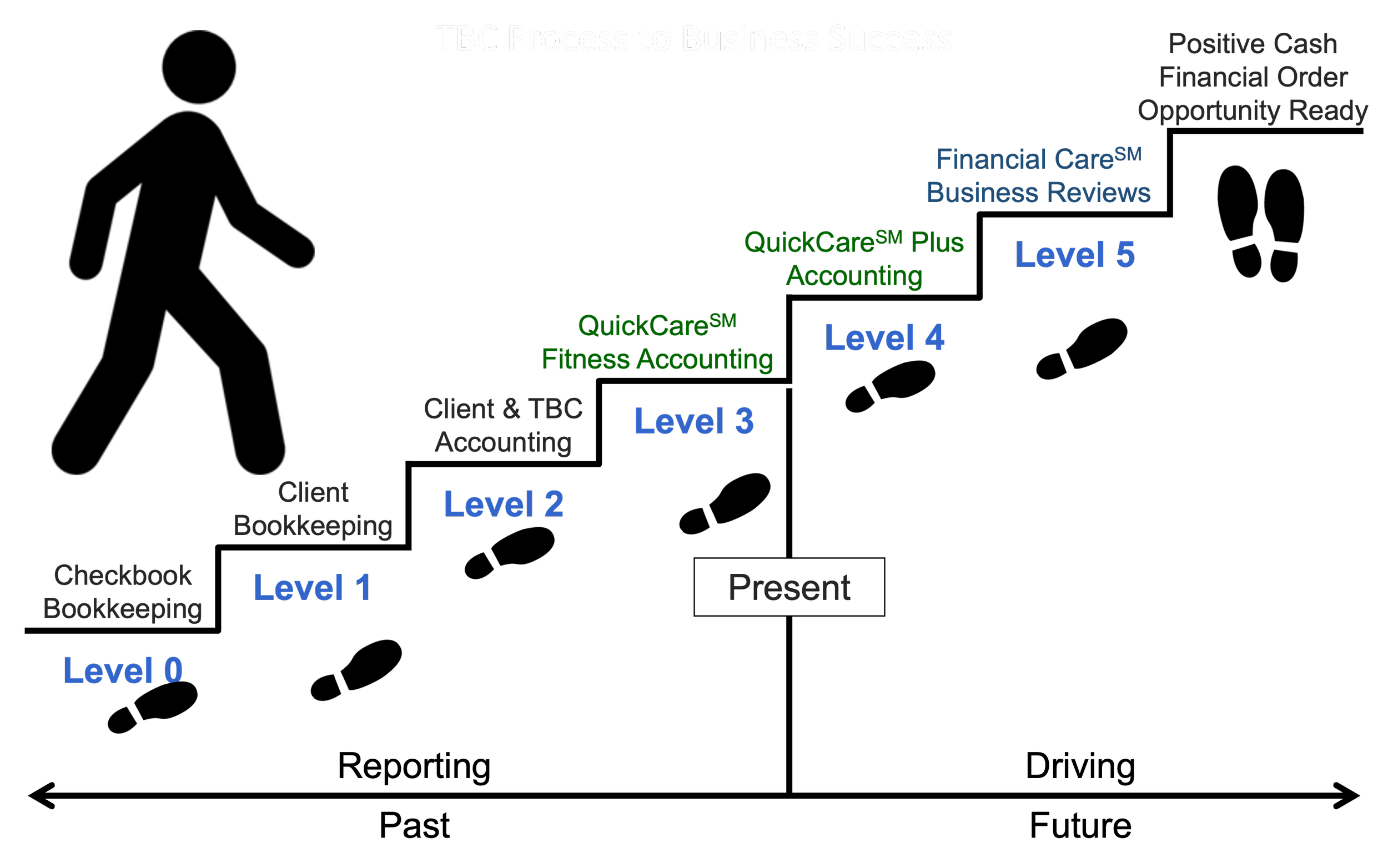
Step Up Accounting Methods
Whether economic times are aiding or restraining business growth, financial detail is necessary for developing and tracking successful plans of actions. Therefore, TBC personnel are trained and available to assist in a broad range of accounting functions from data entry to all the function of a small business Chief Financial Officer.
As an aid in both defining our capability and supplementing the staffs of our clients, we have packaged our services in two proprietary products: QuickCare℠ and Financial Care℠.
QuickCare℠ is centered on the use of QuickBooks and accounting services, in which our Accounting Team members are Intuit QuickBooks ProAdvisors.
Financial Care℠ is broader in scope and addresses business planning, cash flow, funding and business reviews.
“I have been working with Total Business Care for 20 years. They are very professional and a One Stop Shop, they can do it all! Taxes and Business Planning. I highly recommend TBC for a great accounting firm.”
Accounting Articles
Having difficulties tracking the products you sell? QuickBooks Desktop can simplify your inventory. We’ll show you how.
QuickBooks Online comes equipped with a lot of default content and at some point, you may want to update the content and/or layout of a particular function. Here are some options to explore.
Sales Receipts, Invoices and Statements: Are you using the right QuickBooks sales forms in QB Desktop for different situations? Ask us about this.
Can’t wait until a project is done before you start receiving payments? Try progress invoicing in QuickBooks Online.
In this two-part column, we’ll remind you—or show you for the first time—how to use reports in QuickBooks Desktop effectively and comprehensively.
To help maintain the integrity of your company file, QuickBooks Online allows you to assign employees to pre-defined user roles. Need help? Ask us about this.
In this two-part column, we’ll remind you—or show you for the first time—how to use reports in QuickBooks Desktop effectively and comprehensively.
Accounting often requires duplicate data entry. Let QuickBooks Online make some transactions recurring. We can help explain how.
Checking in every few days? Here are some things to do when you launch QuickBooks Desktop.
While often used interchangeably, bookkeeping and accounting are distinct but related functions essential for any business's financial health. Read more to find out the differences between them!
Got customer payments coming in? QuickBooks Online has multiple ways to accept and record them. If you’re unsure, we’re here to help.
Not sure whether you’re making a profit on the jobs you do for customers? Want to bill a customer for costs related to a specific job you’re doing? QuickBooks doesn’t offer true project management, but it allows you to assign transactions to jobs, which makes it easy to track job costs. We’ll show you how!
This Accounting Guide contains information regarding what accounting is, key financial documents, essential accounting terms and more that will assist you in understanding the principles and practices of financial reporting and management.
Are you interested in connecting your bank to your company file in QuickBooks Online? Here are step-by-step instructions to how this all works.
There are many ways to get a business overview in QuickBooks Desktop. We recommend its Insights and Snapshots pages. Don’t know how to utilize these pages? We can help you with this!
Unlock the full potential of QuickBooks Online for your business with these best practices designed to streamline your accounting processes and improve financial accuracy.
Do you create regular data backups in QuickBooks Desktop? You can create a local backup of your QuickBooks company file either manually or automatically. Don’t know how? - We can help you with this!
Struggling with tracking your product inventory? The Products and Services page on QuickBooks Online can provide real-time information about your inventory.
Do you have a regular bookkeeping routine you follow in QuickBooks Desktop? Adhering to a daily, weekly, monthly, quarterly, annual schedule will help maintain accurate financial records and ensure timely reporting and compliance.
Customers paying late and wish to improve your cash flow? Consider setting up automated email reminders in QuickBooks Online. We can walk you through this.
Did you know you can store all kinds of accounting records in QuickBooks Desktop? Ask us about the Doc Center.
Are you tired of repetitive categorization in QuickBooks Online? Learn about its Rules! We can walk you through this.
Having difficulties with customers not paying their invoices? Here are some actions you can take to accelerate your receivables in QuickBooks Desktop!
Do you have a regular routine you go through to make the best use of QuickBooks Online? We have some suggestions for you.
Why reconcile your bank accounts? You can catch errors, for one thing. We can help with this challenging process! Here are 6 tips for preparing your company file in QuickBooks Desktop for monthly reconciliation.
How often do you log into QuickBooks Online? Just spending a little bit of time on QBO regularly can help keep your records up-to-date. Here are some suggestions on what areas to review!
December is a busy time. Need assistance on what information you can do to prepare for the New Year? Here are some suggestions on what you can now in QuickBooks Desktop.
QuickBooks Online can enhance your company’s bottom line by improving your cash flow, customer relationships, inventory balance, and your future. Here are 5 ways that QBO can help make you more profitable.
November is a good time to start planning your 2024 accounting wrap-up in QuickBooks Desktop. We can give you some suggestions on which reports to run!
Don't get tricked into giving out your personal information! Learn about some of the current scams are and how to report them.
Were you able to find what you are looking for?
If not, would would be happy to assist you! We invite you to contact our office so we may work with you to find the information you need.